Difference between revisions of "PMCC Participacion"
From energypedia
***** (***** | *****) m |
***** (***** | *****) m |
||
| Line 6: | Line 6: | ||
|- | |- | ||
| style="background-color: rgb(0, 204, 255)" | | | style="background-color: rgb(0, 204, 255)" | | ||
| − | + | <p style="font-size: 1.5em">1 Crea tu cuenta en energypedia</p> | |
|} | |} | ||
| Line 14: | Line 14: | ||
<br/>[[File:RegisterContribute.png|left|200px|alt=RegisterContribute.png|link=https://energypedia.info/wiki/Special:RequestAccount]] | <br/>[[File:RegisterContribute.png|left|200px|alt=RegisterContribute.png|link=https://energypedia.info/wiki/Special:RequestAccount]] | ||
| + | <br/> | ||
| + | <br/> | ||
{| style="width:100%" cellspacing="0" cellpadding="5" border="0" | {| style="width:100%" cellspacing="0" cellpadding="5" border="0" | ||
|- | |- | ||
| style="background-color: rgb(0, 153, 255)" | | | style="background-color: rgb(0, 153, 255)" | | ||
| − | + | <p style="font-size: 1.5em">2 Cambia tus preferencias de idioma</p> | |
|} | |} | ||
| Line 24: | Line 26: | ||
<br/>[[File:Preferencias.png|left|700px|alt=Preferencias.png|link=https://energypedia.info/index.php?title=Special:Preferences&success=1]]<br/><br/><br/> | <br/>[[File:Preferencias.png|left|700px|alt=Preferencias.png|link=https://energypedia.info/index.php?title=Special:Preferences&success=1]]<br/><br/><br/> | ||
| − | + | <br/> | |
| + | <br/> | ||
{| style="width:100%" cellspacing="0" cellpadding="5" border="0" | {| style="width:100%" cellspacing="0" cellpadding="5" border="0" | ||
|- | |- | ||
| style="background-color: rgb(0, 102, 255)" | | | style="background-color: rgb(0, 102, 255)" | | ||
| − | + | <p style="font-size: 1.5em">3 Navega el portal PMCC</p> | |
|} | |} | ||
| Line 61: | Line 64: | ||
[[File:Busqueda.png|left|400px|alt=Busqueda.png|link=https://energypedia.info/wiki/Special:RunQuery/PMCC_Database_Search]] | [[File:Busqueda.png|left|400px|alt=Busqueda.png|link=https://energypedia.info/wiki/Special:RunQuery/PMCC_Database_Search]] | ||
| − | + | <br/> | |
| + | <br/> | ||
{| style="width:100%" cellspacing="0" cellpadding="5" border="0" | {| style="width:100%" cellspacing="0" cellpadding="5" border="0" | ||
|- | |- | ||
| style="background-color: rgb(0, 51, 255)" | | | style="background-color: rgb(0, 51, 255)" | | ||
| − | + | <span style="color:#FFFFFF"><p style="font-size: 1.5em">4 Crear una nueva entrada</p></span> | |
|} | |} | ||
| Line 80: | Line 84: | ||
<br/> | <br/> | ||
| − | + | <br/> | |
| + | <br/> | ||
{| style="width:100%" cellspacing="0" cellpadding="5" border="0" | {| style="width:100%" cellspacing="0" cellpadding="5" border="0" | ||
|- | |- | ||
| style="background-color: rgb(0, 0, 255)" | | | style="background-color: rgb(0, 0, 255)" | | ||
| − | + | <span style="color:#FFFFFF"><p style="font-size: 1.5em">5 Comenta otras entradas o crea una discusión temática</p></span> | |
|} | |} | ||
| Line 92: | Line 97: | ||
[[File:DiscusionPMCC.png|left|500px|alt=DiscusionPMCC.png]] | [[File:DiscusionPMCC.png|left|500px|alt=DiscusionPMCC.png]] | ||
| − | + | <br/> | |
| + | <br/> | ||
{| style="width:100%" cellspacing="0" cellpadding="5" border="0" | {| style="width:100%" cellspacing="0" cellpadding="5" border="0" | ||
|- | |- | ||
| style="background-color: rgb(0, 0, 204)" | | | style="background-color: rgb(0, 0, 204)" | | ||
| − | + | <span style="color:#FFFFFF"><p style="font-size: 1.5em">6 Suscrete al Portal de PMCC para quedar informado sobre novedades al grupo</p></span> | |
|} | |} | ||
| Line 104: | Line 110: | ||
[[File:NoticiasPMCC.png|left|300px|alt=NoticiasPMCC.png]] | [[File:NoticiasPMCC.png|left|300px|alt=NoticiasPMCC.png]] | ||
| − | + | <br/> | |
| + | <br/> | ||
{| style="width:100%" cellspacing="0" cellpadding="5" border="0" | {| style="width:100%" cellspacing="0" cellpadding="5" border="0" | ||
|- | |- | ||
| style="background-color: rgb(0, 51, 153)" | | | style="background-color: rgb(0, 51, 153)" | | ||
| − | + | <span style="color:#FFFFFF"><p style="font-size: 1.5em">7 Preguntas?</p></span> | |
|} | |} | ||
Revision as of 16:09, 4 April 2019
¿Cómo participar?
|
1 Crea tu cuenta en energypedia |
- Todo el mundo puede registrarse de forma gratuita: https://energypedia.info/wiki/Special:RequestAccount
|
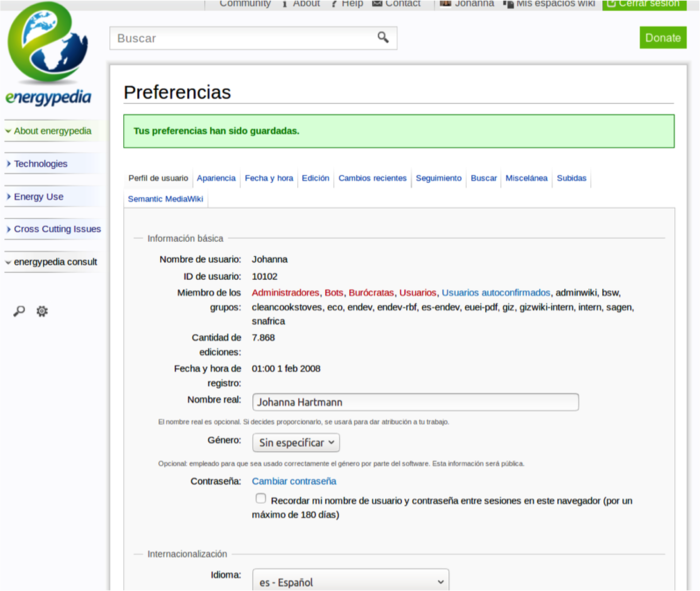
2 Cambia tus preferencias de idioma |
- Cada uno puede cambiar sus preferencias: es – Español
|
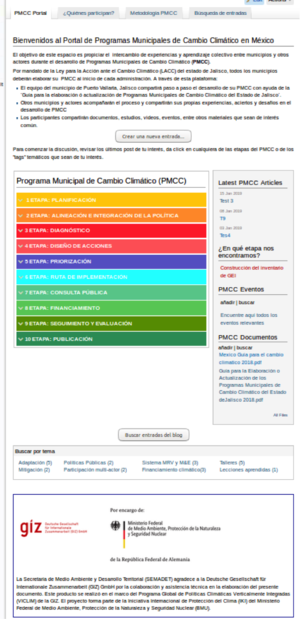
3 Navega el portal PMCC |
Portal: página prinicipal
|
 |
Quienes participan
Metodología para la elaboración o actualización de PMCC
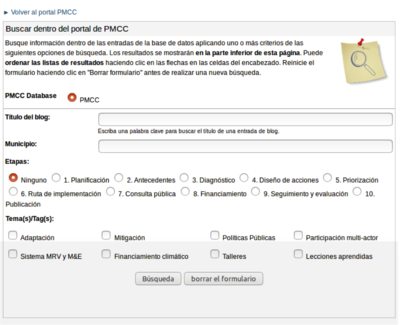
Buscar entradas
|
4 Crear una nueva entrada |
Simplemente haz click en agregar nueva entrada:
- Título
- Texto de la experiencia
- Elija una etapa
- Elija temas respectivos
- Nombre de su municipio
Visualización automática en la pagina principal en la etapa selectada.

|
5 Comenta otras entradas o crea una discusión temática |
- Cada entrada tiene su propia pagina de discusión para que los usarios puedan hacer preguntas. Los consultores y los demás usuarios pueden contestar directmente.
- Las preguntas están visibles en cada página.

|
6 Suscrete al Portal de PMCC para quedar informado sobre novedades al grupo |
- Pueden informar al grupo sobre nuevas entradas y eventos.
- Haz click en el botón "Join Group" en la página del grupo PMCC para suscribirte.

|
7 Preguntas? |
- Sección de ayuda en energypedia (en inglés)
- Nos puedan contactar cuando gusten: johanna@energypedia o hector@energypdia